EVENT INVITE
GUEST WIFI - is the one labelled guest WiFi and you can put any old email in.
j.ohare5@salford.ac.uk
MayEvent
About me
— working/pages/Introduction to me.md
About This Knowledge Graph
This interface is an example of Knowledge Graphing powered by Logseq, a knowledge management and note-taking tool integrated with AI capabilities. Updated a couple of times a week — you may need to hit
This is the raw "shoot from the hip" Logseq graph. There is a manual version where key topics are injected back in to create edges, and a [[Knowledge Graphing]] pipeline using [[Microsoft]] [[GraphRAG]]. They power [some experimental immersive work](https://github.com/jjohare/logseqSpringThing/tree/feature-branch) which will be ready soon, probably. ### Note about links In my version of the knowledge graph, all Twitter links render interactively inline. On the web you will just see "loading." Sometimes a loading indicator with no link means I forgot to add the reference. — working/pages/Introduction to me.mdCTRL-Rto refresh. Below is the graph view of about 1/6 of my current research base. You can also find it as “Graph” top right of this page.
— working/pages/Introduction to me.md
Diffusion models from Overview of Machine Learning Techniques
6️⃣ Diffusion Models (Generative Models)
Description: Advanced models that ‘diffuse’ data to create new, synthetic outputs, using efficient Transformers Explain: Imagine starting with a noisy, random pattern and gradually shaping it into a clear picture. Paper: Diffusion Models: A Comprehensive Survey of Methods and Applications (Note: This covers the lot including:) — working/pages/Overview of Machine Learning Techniques.md
7️⃣ 🟢 Transformers
Description: Circa 2017, introduced self-attention mechanism to capture dependencies between different words in a sequence. Explain: Examines the interdependencies across a wider view of words / tokens Paper: Attention Is All You Need (arxiv.org) (underpinned recent advances) Not the only game in town State Space and Other Approaches and others — working/pages/Overview of Machine Learning Techniques.md
OpenAI ChatGPT-4o (omni)
Free to use, for everyone! Not private by default. True multi modality across video, images, and audio. The first of the true publicly accessible models trained without compromise for multi-modality. Multi-lingual across 50 languages, supporting image input and output, real time video input, text to 3D. Empathetic voice to voice with very low latency. Min Choi on X: “I used GPT-4o to create STL file for 3D model in ~ 20 seconds on my phone. Pretty remarkable what you can generate with AI and simple prompt now. https://t.co/2fbObrpPol” / X (twitter.com) https://twitter.com/minchoi/status/1790396782200987662 — working/pages/multimodal.md
Why Stable Diffusion?
Image, Video and 3D
Stable Diffusion and Stable Video Diffusion allow a lot of control, but at a cost of complexity.
Stable Diffusion 1.5, XL, and 3
UK company with global impact. It is likely now winding up it’s operations after difficulty generating revenue in the hyper competitive GenAI market. Introduction: Open-source model by StabilityAI Cost: Free to run on own hardware; nominal fee for online tools. User Interface: User-friendly through platforms like Leonardo.AI. Strengths: Unlimited control, good image quality, no censorship. Weaknesses: Requires decent hardware, steep learning curve. Questions about Stability business. Skill Level: Intermediate to advanced.
Text-to-Image Generation
Stable Diffusion generates realistic and imaginative images from descriptive text prompts. This core functionality allows users to translate their creative visions into visual form with remarkable accuracy and detail. Whether it’s a photorealistic portrait, a surreal landscape, or an abstract concept, Stable Diffusion can bring your ideas to life with just a few words. A lot of the products you see on the market are either wrappers for the big AI companies, or else leveraging Stability models on rented cloud compute.

Open Source
Stable Diffusion’s open-source nature sets it apart from many other generative AI models. Users have free access to the model’s weights and a lot of modular code, allowing them to modify, distribute, and build upon it. This openness fosters collaboration, innovation, and community driven development. Ensures that the technology is not controlled by a select few entities. For brands and private companies this allows private development of digital assets.
User Friendly Interfaces
Platforms like Leonardo.AI, RunDiffusion and Automatic1111’s WebUI provide intuitive and user friendly interfaces for interacting with Stable Diffusion.
Rundiffusion
These interfaces offer a range of options for customizing parameters, fine tuning models, and experimenting with different artistic styles. ### Customisation Stable Diffusion's flexibility extends to its ability to be fine-tuned on custom datasets. Techniques like [[KOHYA Dreambooth and similar]] and [[LoRA DoRA etc]] training allow users to tailor the model to their specific needs and generate images that align with their unique artistic visions or domain-specific requirements. :LOGBOOK: CLOCK: [2024-05-12 Sun 11:12:30]--[2024-05-12 Sun 11:12:31] => 00:00:01 :END:  This opens up a world of possibilities for creating personalised images, Generating images of specific objects or individuals, Developing models for specialised domains like [[Fashion]] or architectural design. ### Community Support One of Stable Diffusion's greatest strengths is its vibrant and active community. … — working/pages/Stable Diffusion.md
ComfyUI
- Started out as a project by a single coder
- Now adopted by the Stability team as their in house engine
- Tens of thousands of models and add ons, hundreds of thousands of users
- Can form the foundation of a deployable product
- API for Comfy iteself
- It’s just chaining python scripts, you can isolate those and build
Tradeoffs
- Faster.
- Incredible control.
- Steep learning curve.
- Hard to setup, hard to keep running.
Finding all the tools.
https://github.com/comfyanonymous/ComfyUI
https://www.comfyworkflows.com
Lots of modules, extensions
- Papers from the GenAI community get rapidly converted to ComfyUI very quickly.
Segmentation
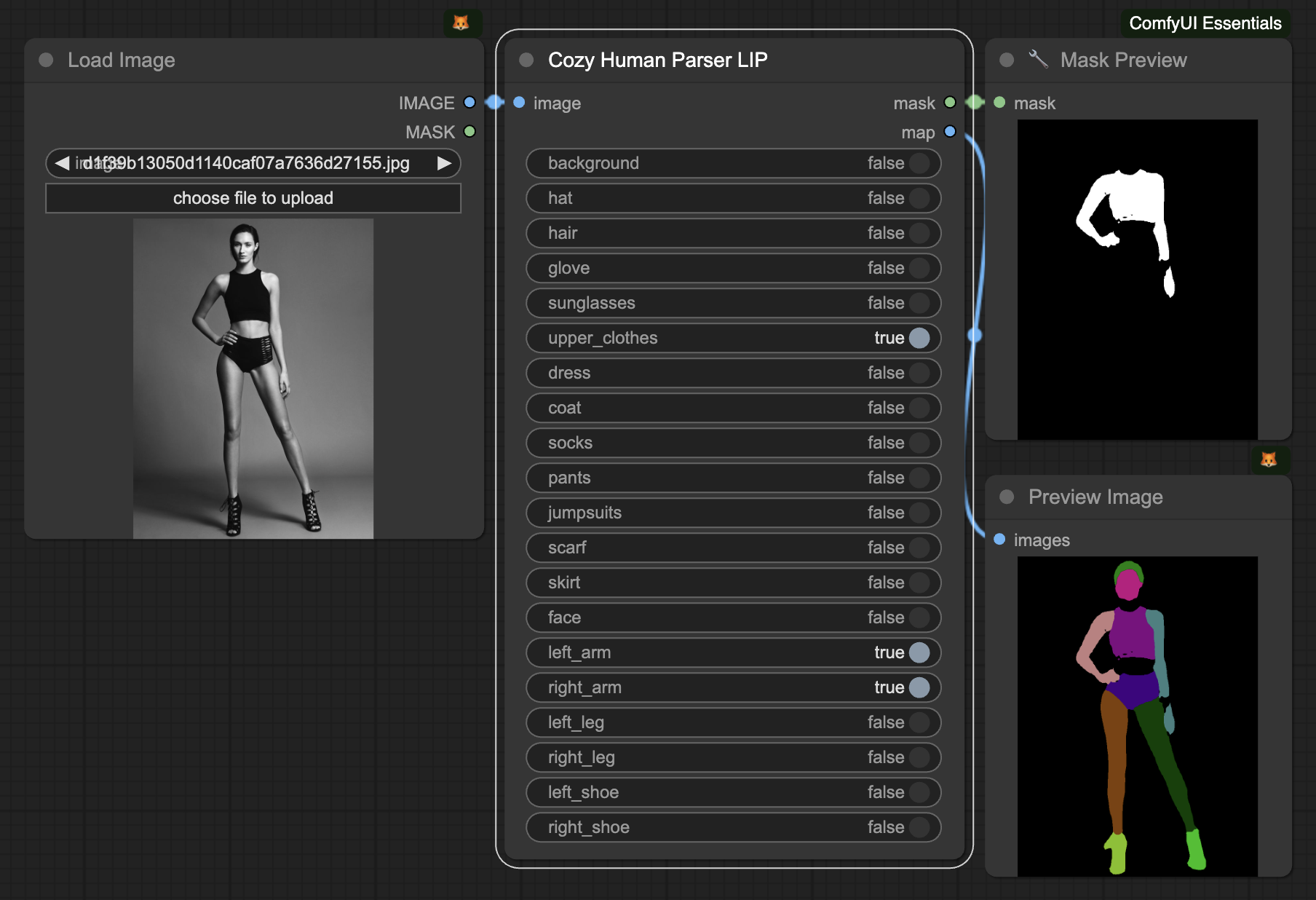
IpAdapter
- Image to image conditioning, which is style transfer, which is mashing images together.

3D models for AR and VR
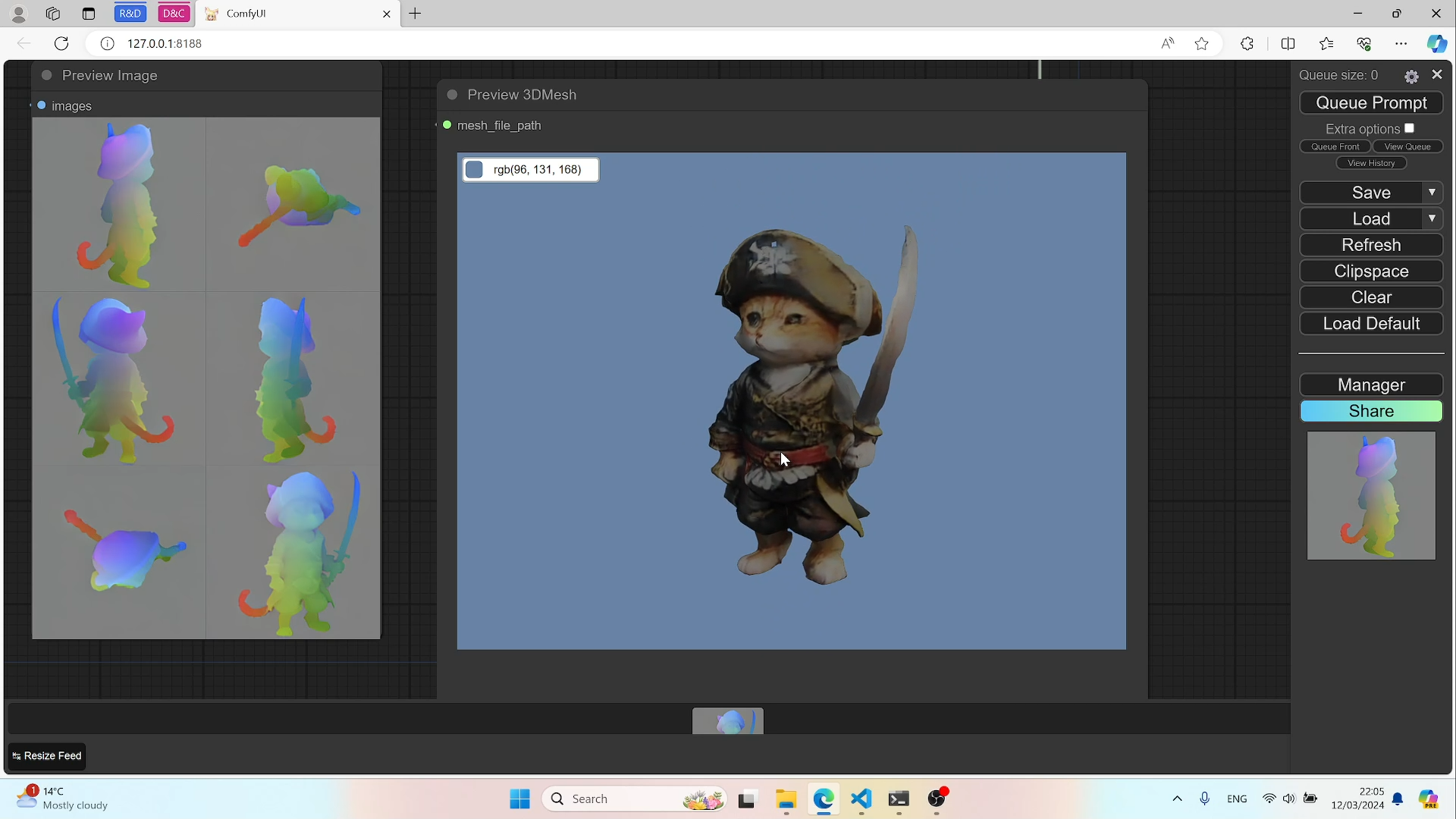
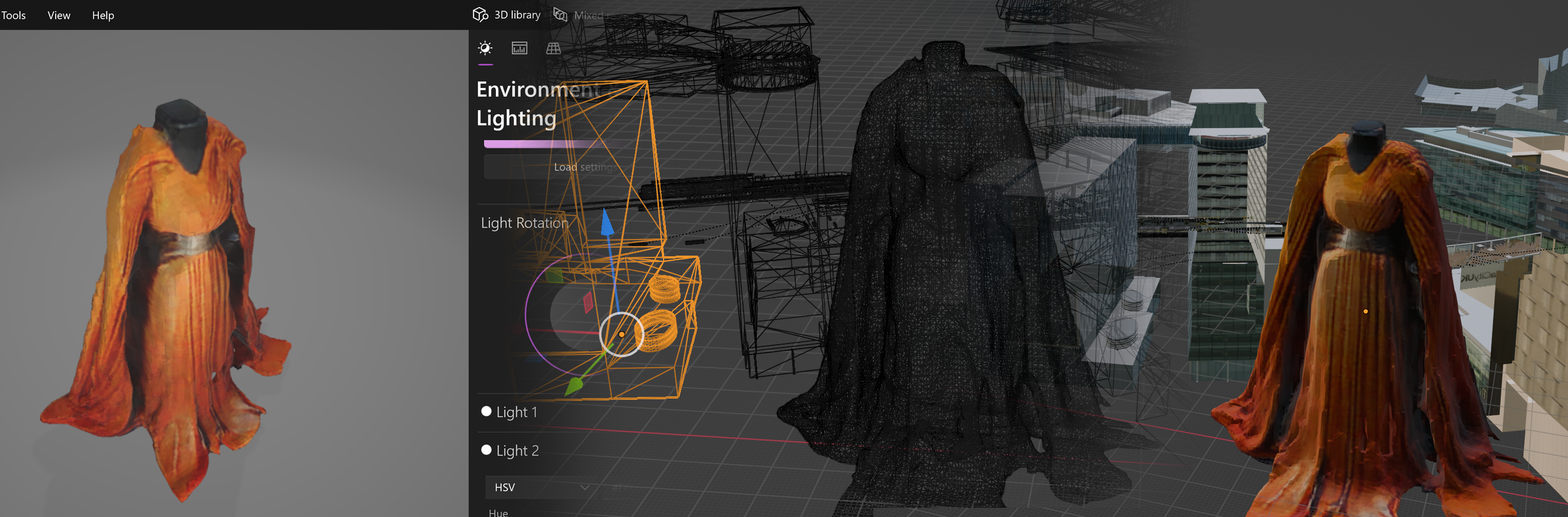
May Event workflow with 3D models and VTON try it on.
Marco presentation
< link not working let >
Pre event buildout notes (here be dragons)
- Infrastructure build
- Get Ollama bridge working
- stavsap/comfyui-ollama (github.com)
- MinusZoneAI/ComfyUI-Prompt-MZ: 基于llama.cpp的一些和提示词相关的节点,目前包括美化提示词和类似clip-interrogator的图片反推 | Use llama.cpp to assist in generating some nodes related to prompt words, including beautifying prompt words and image recognition similar to clip-interrogator (github.com)
- xXAdonesXx/NodeGPT: ComfyUI Extension Nodes for Automated Text Generation. (github.com)
- stavsap/comfyui-ollama (github.com)
- Backup the working docker
- sort the vpn and port forwarding
- Check the security
- Install the rest of the feature set
- Sort the models and Loras
- Fire up 3 instances
- TripoSR (no point, feature dropped)
- Zero123 (no point, feature dropped
- CRM
- yisol/IDM-VTON: IDM-VTON : Improving Diffusion Models for Authentic Virtual Try-on in the Wild (github.com)
- Lllava 8b? for descriptions :LOGBOOK: CLOCK: [2024-05-06 Mon 09:23:58]—[2024-05-06 Mon 09:23:58] ⇒ 00:00:00 CLOCK: [2024-05-06 Mon 09:23:59]—[2024-05-06 Mon 09:24:00] ⇒ 00:00:01 :END:
- Face swap
- NSFW filter
- Annotations and instructions :LOGBOOK: CLOCK: [2024-05-06 Mon 09:25:33]—[2024-05-06 Mon 12:16:24] ⇒ 02:50:51 :END:
- Send to Pete to test
- Presentation outlines?
- Talk to Marco
- Next need to fix insightface as here but
- backup first :LOGBOOK: CLOCK: [2024-05-06 Mon 10:23:31]—[2024-05-06 Mon 10:23:31] ⇒ 00:00:00 :END:
- New nets and workflows? Pete?
- Confirm the compute arriving.
- Confirm the TV in time?
- Fix the windows laptop for delegates
- Condition the mac for delegates (come in monday afternoon)
- Charge the Rundiffusion account (talking to Tony this afternoon).
- Catering
- Talk to Marco
- Make a presentation for the day (logseq based for me) :LOGBOOK: CLOCK: [2024-05-12 Sun 16:41:41]—[2024-05-14 Tue 22:17:47] ⇒ 53:36:06 :END:
- Delegate advance communications :LOGBOOK: CLOCK: [2024-05-11 Sat 19:58:36]—[2024-05-12 Sun 16:41:31] ⇒ 20:42:55 CLOCK: [2024-05-12 Sun 16:41:35]—[2024-05-14 Tue 22:17:50] ⇒ 53:36:15 :END:
- Get Ollama bridge working
Technical Elements
Technical notes
-
For the A6000 CRM docker
machinelearn@MLAI:/mnt/mldata/GenerativeAI$ cd ../githubs/ComfyUI-Docker/ machinelearn@MLAI:/mnt/mldata/githubs/ComfyUI-Docker$ ls docker-compose.yml docs megapak README.zh.adoc scripts storage_known_good Dockerfile LICENSE README.adoc rocm storage machinelearn@MLAI:/mnt/mldata/githubs/ComfyUI-Docker$ docker run -d -it --rm --name comfyui-mega --gpus '"device=1"' -p 8182:8182 -v "$(pwd)"/storage:/root -e CLI_ARGS="--port 8182" yanwk/comfyui-boot:megapak -
to contact Ollama from within docker
curl http://172.17.0.1:11434/api/generate -d '{
  "model": "llama3-8B",
  "prompt": "Why is the sky blue?"
}'
ComfyUI for Fashion and Brands: Event Instructions
Introduction
- Welcome to the ComfyUI for Fashion and Brands event at Dreamlab in MediaCity! We are excited to have you join us for a day of innovation, collaboration, and exploration of generative AI technology in the realm of fashion and product design.
- Before the event, please take a moment to review the following instructions and ensure that you have the necessary requirements to fully participate in the hackathon.
Timing and how to find us.
- We’re on the 5th floor of Blue Tower at HOST , MediaCityUK. The door is opposite Costa Coffee.
- You can take the tram to MediaCity, using the free park and ride in Trafford.
- You can also park at the MediaCity multistory car park but be advised it is expensive.
- The event starts at 10am and runs to 4pm.
Schedule
- Morning session - presentations from the team and guest speaker.
- Afternoon - breakout hands on
- Closeout Q&A
Workgroup Alignment
- To ensure a tailored experience, we have divided the event into three workgroups. Please fill out the following Google Form to let us know which workgroup you would like to join:
- Choose your preferred workstream for the hands on event (Google Form)
- The workgroups are as follows:
- Novices: This group will learn ComfyUI online using RunDiffusion with the assistance of a coach. VPN setup is not required for this group.
- Intermediate: Participants in this group must set up the VPN (instructions provided below) and will work on a more advanced fashion and brands workflow with a different coach.
- Advanced / Hackathon: This is a small group of up to five participants (first-come, first-served) who will work on code development with a specialist.
VPN Setup Instructions
- For the Intermediate workgroup, setting up the VPN is essential. Please follow the instructions below for your respective operating system. On the day of the event, you will receive a username and password. Use these credentials when prompted by the OpenVPN client.
Windows
- Download the OpenVPN client from the official website: https://openvpn.net/community-downloads/
- Install the OpenVPN client on your laptop.
- Obtain the
vpn.ovpnfile provided by the event organisers. - Launch the OpenVPN client and import the
vpn.ovpnfile. - On the day of the event, you will receive a username and password. Use these credentials to connect to the VPN.
macOS
- Download the official OpenVPN Connect client from the App Store: https://apps.apple.com/us/app/openvpn-connect/id590379981
- Install the OpenVPN Connect client on your laptop.
- Obtain the
vpn.ovpnfile provided by the event organisers. - Launch the OpenVPN Connect client and import the
vpn.ovpnfile. - On the day of the event, you will receive a username and password. Use these credentials to connect to the VPN.
Linux
GUI Tools for Connecting to OpenVPN
- Both KDE and GNOME offer plugins for their network manager applets that allow VPN connection to an OpenVPN server. The necessary plugins are:
- KDE: network-manager-openvpn-kde
- GNOME: network-manager-openvpn-gnome
- More than likely, those plugins will not be installed on the distribution by default. A quick search using the Add/Remove Software utility will allow for the installation of either plugin. Once installed, the use of the network manager applets is quite simple, just follow these steps (I will demonstrate using the KDE network manager applet):
- Open up the network manager applet by clicking on the network icon in the notification area (aka System Tray.)
- Click on the Manage Connections button.
- Select the VPN tab.
- Click the Add button to open up the VPN type drop-down.
- Select OpenVPN from the list.
- Fill out the necessary information on the OpenVPN tab
- We look forward to seeing you at the ComfyUI for Fashion and Brands event! If you have any questions or concerns, please don’t hesitate to reach out to the event organisers.
- Remember to bring your laptop and a passion for fashion, innovation, and AI-driven creation. Let’s push the boundaries of generative AI together!
- www.eventbrite.co.uk/e/comfy-ui-for-fashion-and-brands-tickets-894342842517